
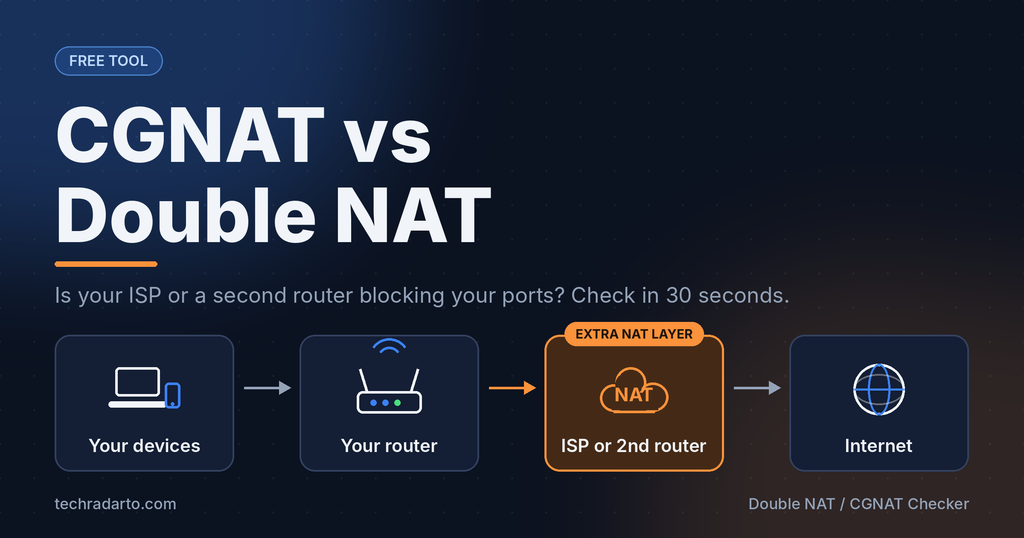
If port forwarding won’t work, your game console says “Strict NAT”, or you can’t reach your home cameras from outside, you may be behind CGNAT or double NAT. Both mean your router isn’t directly connected to the internet. This free checker tells you which one you have, and the guide below explains how to fix it.
CGNAT and double NAT checker
Find out whether another router or your ISP sits between your home router and the internet.
How do I find my router’s WAN IP?
- Open your router’s admin page. The address is usually printed on the router’s label and is often 192.168.1.1, 192.168.0.1 or 10.0.0.1.
- Log in with the admin username and password.
- Open the Status, Internet or WAN page.
- Copy the IP address shown for the WAN or Internet connection, not the LAN address.
The check runs in your browser and supports IPv4 addresses only. The “Detect it for me” button asks api.ipify.org (and, if that fails, Cloudflare) for your public IP. The result is a strong indicator, not a guarantee, so confirm with your ISP if it matters.
How to read your result
The checker compares your router’s WAN (Internet) IP address with your public IP address. Here is what each result means.
| Your router’s WAN IP | What it means | What to do |
|---|---|---|
| 100.64.x.x to 100.127.x.x | CGNAT: your ISP shares public IPs between customers | Ask your ISP for a public IP, use IPv6, or use a tunnel |
| 10.x.x.x, 172.16.x.x to 172.31.x.x or 192.168.x.x | Double NAT (or ISP-level NAT): another device sits in front of your router | Bridge the ISP modem/router or remove one router |
| Same as your public IP | No extra NAT layer | Check your firewall and port forwarding rules |
| Public-looking, but different from your public IP | Possible CGNAT, or a VPN is running | Turn off the VPN and test again, then ask your ISP |
| 169.254.x.x | Your router has no valid address from your ISP | Check the modem, cables and ISP status |
What is NAT?
NAT (network address translation) lets every device in your home share one public IP address. Your router keeps track of which device asked for what, and sends replies to the right one. It works well for browsing and streaming. The trouble starts when something on the internet needs to start a connection to your home, because the router doesn’t know which device should receive it unless you set up port forwarding.
What is double NAT?
Double NAT happens when two routers in your home each do NAT. A common setup is an ISP modem/router combo with your own Wi-Fi router plugged into it. Your devices connect to the second router, which gets a private address from the first one, and the first one translates again to the internet.
It usually doesn’t slow your internet down, but it breaks port forwarding unless you forward the same ports on both routers.
What is CGNAT?
CGNAT (carrier-grade NAT) is NAT done by your internet provider. Instead of giving each customer a public IPv4 address, the ISP puts many customers behind one shared public address. Your router’s WAN address is then a private or shared address, often in the 100.64.0.0 to 100.127.255.255 range, which is reserved for this purpose.
ISPs use CGNAT because public IPv4 addresses are scarce. Mobile broadband, fixed wireless and some satellite and fiber providers use it more often than cable providers, but it varies by ISP and plan.
Double NAT vs CGNAT
| Double NAT | CGNAT | |
|---|---|---|
| Where it happens | Inside your home (two routers) | At your ISP |
| Who controls it | You | Your ISP |
| Typical WAN IP | 192.168.x.x, 10.x.x.x or 172.16 to 172.31 | 100.64.x.x to 100.127.x.x (sometimes a private range) |
| Can you fix it yourself? | Usually yes | Usually not without your ISP |
| Port forwarding | Works if set on both routers | Doesn’t work |
You can also have both at the same time.
How to check manually
If you want to confirm the checker’s result yourself:
- Log in to your router’s admin page. The address is usually printed on the router’s label and is often 192.168.1.1, 192.168.0.1 or 10.0.0.1.
- Open the Status, Internet or WAN page and note the WAN IP address.
- In a browser, search “what is my IP” and note the public address it shows.
- Compare them. If they match, you’re not behind extra NAT. If they differ, there is NAT upstream.
- Optional: run a traceroute. On Windows, open Command Prompt and type
tracert 1.1.1.1. On Mac, open Terminal and typetraceroute 1.1.1.1. If the first two hops are both private addresses (192.168.x.x or 10.x.x.x), you likely have double NAT. Some networks hide hops, so treat this as a hint, not proof.
Signs you’re behind double NAT or CGNAT
- Port forwarding rules don’t work, even though they are set up correctly.
- Your Xbox shows Moderate or Strict NAT, or your PlayStation shows NAT Type 2 or 3.
- You can’t host a game server, Minecraft server or Plex server for friends.
- Remote access to security cameras, a NAS or a home server fails.
- Some VPNs, VoIP apps or peer-to-peer apps connect poorly.
- Websites show extra CAPTCHAs or block you, because many customers share the same IP.
How to fix double NAT
Pick the option that matches your setup.
Option 1: Put the ISP modem/router in bridge mode. Log in to the ISP device and look for “bridge mode”, “IP passthrough” or “modem only mode”. Your own router will then get the public IP directly. Some ISP devices don’t offer it, and the Wi-Fi on that unit usually turns off, so ask your ISP if you’re unsure.
Option 2: Use your second router as an access point. On the second router, turn off its DHCP server and NAT/router mode (or switch it to “access point mode”), then connect the first router to a LAN port on the second. Don’t use the second router’s WAN port.
Option 3: Use only one router. If your ISP device has built-in Wi-Fi that’s good enough, remove your own router. If your router is better, ask whether your ISP can supply a modem-only unit.
Option 4 (workaround): Forward ports on both routers. Forward the port on the first router to the second router’s WAN address, then forward it again on the second router to your device. It works, but it’s fragile if addresses change.
After any change, restart both devices and run the checker again.
How to get around CGNAT
You can’t turn CGNAT off yourself, because it’s on your ISP’s side. Your options are:
- Ask for a public IP address. Many ISPs will assign one, sometimes for a monthly fee or on a business plan. Ask whether they offer a static or dedicated public IPv4 address.
- Use IPv6. If your ISP gives you IPv6, your devices can have public addresses with no NAT. Both ends of the connection need IPv6, and your router’s firewall must allow the traffic.
- Use a tunnel or relay for remote access. Tools like Tailscale or Cloudflare Tunnel let you reach devices at home without port forwarding.
- Rent a small VPS and tunnel to it. This lets you host a public service from behind CGNAT, but it takes more technical setup.
- Use a VPN that offers port forwarding. This can help for gaming or peer-to-peer apps, but results vary by provider.
- Switch plan or provider. If you need inbound connections regularly, a provider that gives public IPs may be the simplest fix.
Does it affect gaming?
Yes, mostly for matchmaking and voice chat. Consoles report NAT types: Xbox uses Open, Moderate and Strict, and PlayStation uses NAT Type 1, 2 and 3. Double NAT often causes Moderate or Strict results.
UPnP only opens ports on the router your console is connected to, so it can’t reach through a second NAT layer. Fixing double NAT with bridge mode or an access point setup usually resolves it. Under CGNAT, you’ll need a public IP from your ISP, IPv6 or a gaming-friendly VPN. For more gaming network help, see our Gaming & Tech guides.
Is it a security problem?
Not by itself. NAT blocks most unsolicited inbound traffic by default, which some people see as a small side benefit, but it isn’t a firewall. The downsides are practical: broken port forwarding, harder remote access, and shared IP addresses that other customers may have misused, which can cause blocks or CAPTCHAs. Keep your router’s firewall on and its firmware updated either way.
FAQ
Is double NAT the same as CGNAT? No. Double NAT happens inside your home, while CGNAT happens at your ISP. You can fix double NAT yourself, but CGNAT needs your ISP.
Is 100.64.x.x always CGNAT? For a router’s WAN address, almost always. The 100.64.0.0/10 range is reserved for carrier-grade NAT. Note that some apps, such as Tailscale, also assign devices addresses in this range, but those are device addresses, not your router’s WAN address.
Does double NAT slow down my internet? Usually not in a way you’ll notice. The main problems are blocked inbound connections and port forwarding.
Can I have CGNAT and double NAT together? Yes. If your WAN address is in the 100.64 range and you have a second router behind it, you have both.
Will bridge mode break my Wi-Fi? It can turn off the Wi-Fi on the ISP device. Your own router then provides Wi-Fi instead.
Can a VPN make the checker show a mismatch? Yes. A VPN on your router or computer changes the public IP the internet sees. Turn it off and test again.
How do I ask my ISP for a public IP? Contact support and ask whether your connection uses CGNAT and whether they can assign a public (static) IPv4 address, and what it costs.
Conclusion
Use the checker first. If you have double NAT, bridge the ISP modem or remove one router. If you have CGNAT, contact your ISP about a public IP or switch to IPv6 or a tunnel. Run the checker again after any change to confirm it worked.